


Quick Answer
What is the HPCL Business Portal and how do you log in?
The HPCL Business Portal (sales.hpcl.co.in/bportal) is Hindustan Petroleum’s login for existing business partners such as petrol pump dealers, LPG distributors and direct sales customers. You sign in with the Customer ID linked to your HPCL account and your password. It is not used to apply for a new dealership.
Source: HPCL official website, PIB Fact Check, oil company public notices
The HPCL Business Portal drew an estimated 536,000 visits in October 2026, yet the people searching for it often want very different things. One is a dealer who just needs last month’s invoices. Another has a “petrol pump dealership approved” message on WhatsApp and wants to know if it is real. This Pro Business Cop guide is written for both. It covers the HPCL business portal login, explains which HPCL portal fits which job, and shows how to spot the fake sites built to look like it.
What This Portal Is and Who Can Use It
The HPCL Business Portal is a closed login for businesses that already have an account with Hindustan Petroleum. If you do not have a Customer ID from an existing HPCL relationship, you cannot use it, and paying a website or agent to “register” you is a red flag.
HPCL does not publish a detailed public manual for sales.hpcl.co.in, but its website describes the purpose of its customer portal clearly. HPCL calls it a single point of access for customers to manage their day-to-day activities, and says the direct sales customer portal lets buyers access products, invoices, values and payments for their purchases, so both sides can monitor sales and collections (HPCL Direct Sales).
The typical users are HPCL’s existing business partners:
- Retail outlet (petrol pump) dealers checking statements, invoices and payment entries
- HP Gas (LPG) distributors tracking their account with HPCL
- Direct sales and industrial customers who buy petroleum products in bulk
It is busy, too. Semrush estimated 536,120 visits to sales.hpcl.co.in in October 2026, with 96.91% of traffic from India and an almost even split between desktop (49.23%) and mobile (50.77%). That mobile share matters: about half the visits come from phones, so the mobile tip in the troubleshooting table is worth reading.
HPCL Business Portal Login: Step by Step
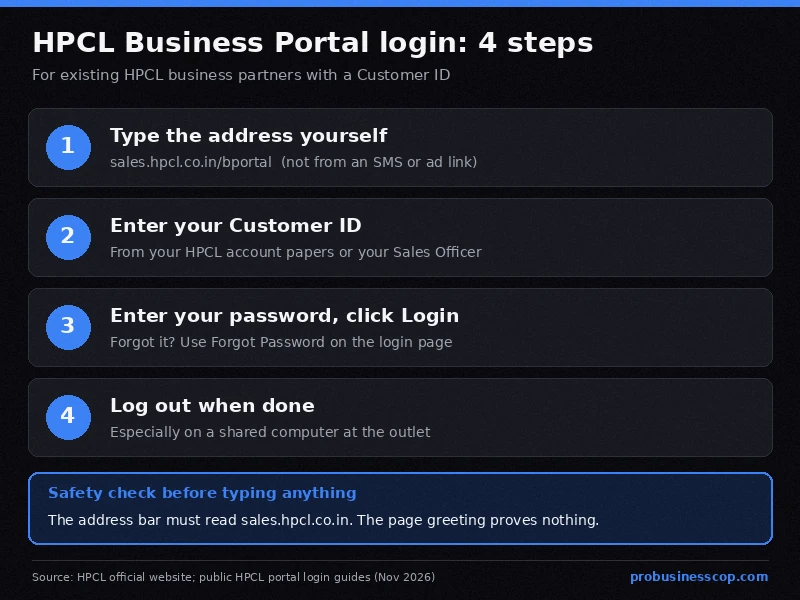
To log in, open sales.hpcl.co.in/bportal, enter your HPCL Customer ID and password, and click Login. That is the whole process for an active account. Everything else on this page is about making sure you are on the right site and fixing it when it fails.
- Type the address yourself. Enter
sales.hpcl.co.in/bportalin the browser instead of clicking a link from an SMS, email or ad. When the HPCL business portal login page opens, check the address bar showshpcl.co.inbefore you type anything. - Enter your Customer ID. This is the code linked to your outlet, agency or company account. If you do not have it handy, check your HPCL account papers or ask your Sales Officer.
- Enter your password and click Login.
- Log out when done, especially on a shared office computer at the outlet.
A quick reality check on the “Welcome to HPCL Business Portal” screen: any page can display that greeting, so the heading proves nothing. The address does. For this portal, it should read sales.hpcl.co.in. Be wary of lookalike addresses, such as hyphenated domains or pages on free website builders.
Forgot your password? Use the Forgot Password option on the login page. If the reset does not reach you (for example, because the registered mobile number or email is outdated), the fix sits with HPCL, not with you. Contact the Sales Officer who handles your outlet or account, or the HPCL regional office listed on the official contact page, and ask them to update your registered details.
Which HPCL Portal Do You Actually Need?
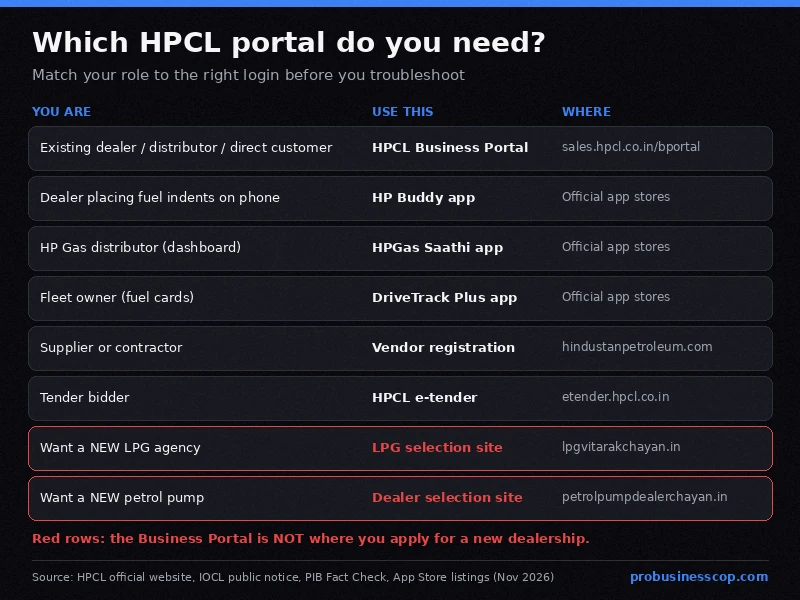
HPCL runs several portals and apps, and using the wrong one causes a lot of avoidable confusion. Match your role to the right door before you troubleshoot anything.
| You are… | You want to… | Use this | Where it lives |
|---|---|---|---|
| Existing dealer, distributor or direct customer | View statements, invoices, payments | HPCL Business Portal | sales.hpcl.co.in/bportal |
| Retail outlet dealer on the move | Place and track fuel indents from a phone | HP Buddy app | Official app stores (publisher: Hindustan Petroleum Corporation Limited) |
| HP Gas distributor | See a dashboard of your distributorship | HPGas Saathi app | Official app stores |
| Fleet owner | Manage DriveTrack Plus fuel cards | DriveTrack Plus app | Official app stores |
| Supplier or contractor | Register as an HPCL vendor | Vendor registration | hindustanpetroleum.com, Quick links, Vendor registration |
| Bidder | Download and submit tenders | HPCL e-tender portal | etender.hpcl.co.in |
| Someone wanting a new LPG agency | Apply for a distributorship | LPG distributor selection site | lpgvitarakchayan.in |
| Someone wanting a new petrol pump | Apply for a dealership | Retail outlet dealer selection site | petrolpumpdealerchayan.in |
If you searched “HPCL portal business portal” hoping to apply for a dealership, the last two rows are for you. The business portal is not where you apply. New LPG distributorships and petrol pump dealerships are advertised and processed through the official selection websites run for public sector oil companies, and HPCL’s Complaints and Feedback page has a separate Business Opportunities section for queries about new retail outlets, LPG distributorships, lubricants and direct sales advertisements.
The phone apps carry real weight for dealers. HP Buddy is labelled “Only for HPCL Business Partner” on the App Store and, as its store listing puts it, lets dealers place and track indents. If your daily task is placing fuel indents, the app can be handier than opening the desktop portal.
Fixing Common Login Problems on the HPCL Portal
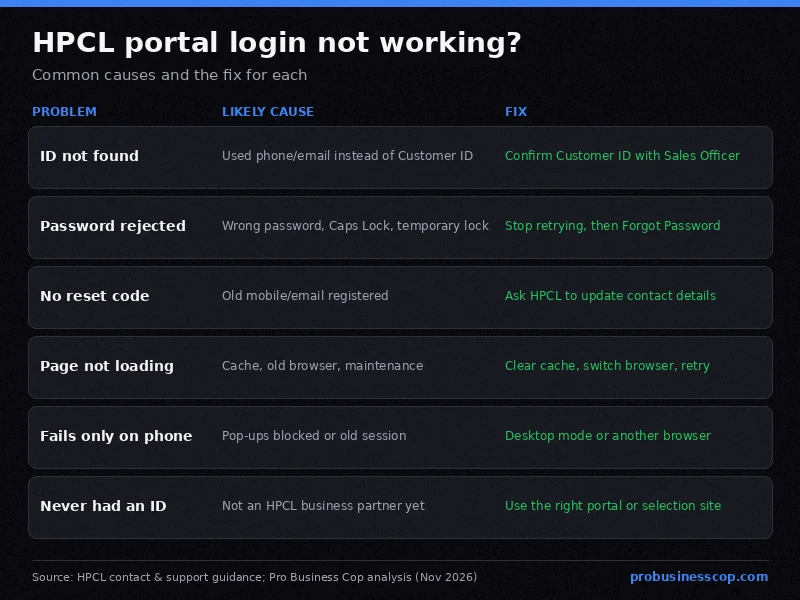
Common causes of login failure are the wrong ID, an outdated contact number, or a browser issue. Work through this table in order before you call anyone.
| What you see | Likely cause | What to do |
|---|---|---|
| “Invalid user” or ID not found | Typing a phone number, email or dealer name instead of the Customer ID | Check your HPCL account papers or confirm the exact Customer ID with your Sales Officer |
| Password rejected after several tries | Wrong password, Caps Lock, or a possible temporary lock after repeated attempts | Stop retrying, wait, then use Forgot Password |
| Reset code never arrives | Registered mobile or email is old | Ask your HPCL Sales Officer to update your details |
| Page does not load or looks broken | Browser cache, old browser, or HPCL maintenance window | Clear cache, try another browser, retry later |
| Works on laptop, fails on phone | Mobile browser blocking pop-ups or saving an old session | Use desktop mode or a different mobile browser |
| You never had an ID | You are not yet an HPCL business partner | You cannot use this portal. See the table above for the right route |
A practical example. Say you run an HP Gas agency and your manager left last year. The registered mobile on your account is still his. Every password reset goes to a phone you no longer control. No amount of browser fixing helps here. A short written request to your HPCL area office to update the contact details solves it, and it also closes a security gap, since an ex-employee should not receive codes for your business account.
Using the Portal for Month-End Work
The real value of the portal is reconciliation: matching HPCL’s record of your purchases and payments with your own books. Doing this every month catches errors while they are still easy to fix.
A simple routine many small dealers and distributors can follow:
- Download the month’s invoice and payment details from the portal.
- Match each HPCL invoice against the purchase entries in your accounting software.
- Match each payment HPCL shows against your bank statement.
- Flag differences in writing to your Sales Officer within the month, while the paper trail is fresh.
- Check GST details on invoices, since input tax credit depends on your GSTIN being right on HPCL’s invoices.
If you still reconcile by hand in a notebook, our comparison of the best small business accounting software in India can help you pick a tool that imports statements. For GST checks, our guide to the GST portal login explains how to confirm what your suppliers have reported against your GSTIN. And because fuel and LPG businesses run on tight working capital, our guide on improving cash flow in small businesses is worth a read alongside your monthly statement.
Fake HPCL Websites and Dealership Scams: How to Spot Them
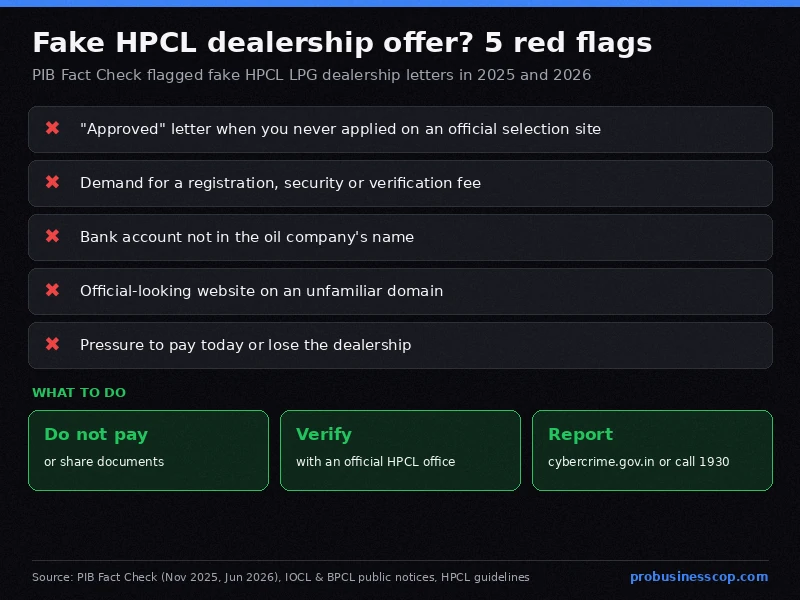
HPCL does not sell dealerships through approval letters, WhatsApp messages or “registration fee” payments, and the government has repeatedly flagged such offers as fake. If anyone asks for money outside an official, advertised selection process, or into an account not in the oil company’s name, treat it as fraud.
This is not a rare problem. In November 2025, PIB Fact Check flagged a letter claiming to approve an HPCL LPG agency dealership as fake and pointed people to lpgvitarakchayan.in for genuine information. In June 2026, PIB again warned about fake LPG dealership offers spreading through emails and messages, aimed at collecting personal data and fake fees. Indian Oil has also warned that fake websites copy the layout of the official selection sites, lpgvitarakchayan.in and petrolpumpdealerchayan.in. HPCL’s own selection guidelines for POL aggregators state it is not responsible for applicants who lose money on deceptively similar fake websites.
Red flags to watch for:
- A letter or email saying you are “approved” or “pre-approved” when you never applied through an official selection website
- Any demand for a “registration charge”, “security deposit” or “verification fee” before a formal process
- Payment details for an account not held in HPCL’s name. A BPCL public notice on dealership fraud points out that the accounts fraudsters share are not in the name of HPCL, IOCL or BPCL
- A website that looks official but sits on an unfamiliar domain
- Pressure to pay “today” or lose the dealership
What to do if you receive one: do not pay or share documents. Contact the nearest HPCL office through the official website to check it. If you have already paid, report it straight away on the National Cyber Crime Reporting Portal (cybercrime.gov.in) or call the 1930 helpline.
A genuine HPCL dealership or distributorship involves real investment, and our comparison of a business loan vs a personal loan can help you plan the funding once you are in a verified selection process.
Security Habits for Dealers and Distributors
Your portal login controls financial records for a business, so treat it like your bank login. A few habits prevent many problems.
- Keep the Customer ID and password with the owner, not the whole staff. If a manager needs access, have a process for changing the password when they leave.
- Bookmark the real address once and always log in from the bookmark.
- Keep your registered mobile and email current with HPCL. This is your recovery route.
- Never share login codes with anyone claiming to be from HPCL over a phone call.
- Download official apps only from listings where the publisher is Hindustan Petroleum Corporation Limited.
Frequently Asked Questions
Can I register on the HPCL Business Portal as a new user?
Not on your own. Access comes with an HPCL business relationship, such as a dealership, distributorship or direct sales account, and the Customer ID is issued by HPCL.
Where do I find my HPCL Customer ID?
Look through your HPCL account documents first. If it is not there, the HPCL Sales Officer who handles your account can confirm it.
Can I apply for a petrol pump or LPG agency through the HPCL Business Portal?
No. New petrol pump dealerships go through petrolpumpdealerchayan.in and new LPG distributorships through lpgvitarakchayan.in, based on published advertisements.
Is there an HPCL app for dealers?
Yes. HP Buddy is built for HPCL business partners and lets dealers place and track indents, while HPGas Saathi gives LPG distributors a dashboard of their business.
What should I do if someone offers me an HPCL dealership for a fee?
Treat it as fraud. Do not pay. Verify with an official HPCL office, and report any payment already made on cybercrime.gov.in or through the 1930 helpline.
Is the HPCL Business Portal the same as the vendor portal?
No. Suppliers and contractors register through the vendor registration link on hindustanpetroleum.com, and tenders run on etender.hpcl.co.in.
Running a Fuel or LPG Business? Keep Learning with Pro Business Cop
Logging in is the easy part. Keeping your books matched, your GST credits safe and your working capital healthy is what keeps a dealership profitable. Pro Business Cop publishes practical, India-focused guides for small business owners, from registering a small business in India to managing cash flow. Explore the Pro Business Cop business section for more, or reach us through our contact page.
Disclaimer
Pro Business Cop is an independent publication and is not affiliated with Hindustan Petroleum Corporation Limited. This article is for general information only; see our full disclaimer. Portal addresses, features and processes can change, so always confirm details on HPCL’s official website or with your HPCL Sales Officer. Never share your login details with anyone, and do not make payments for dealerships outside an official, published selection process.
