
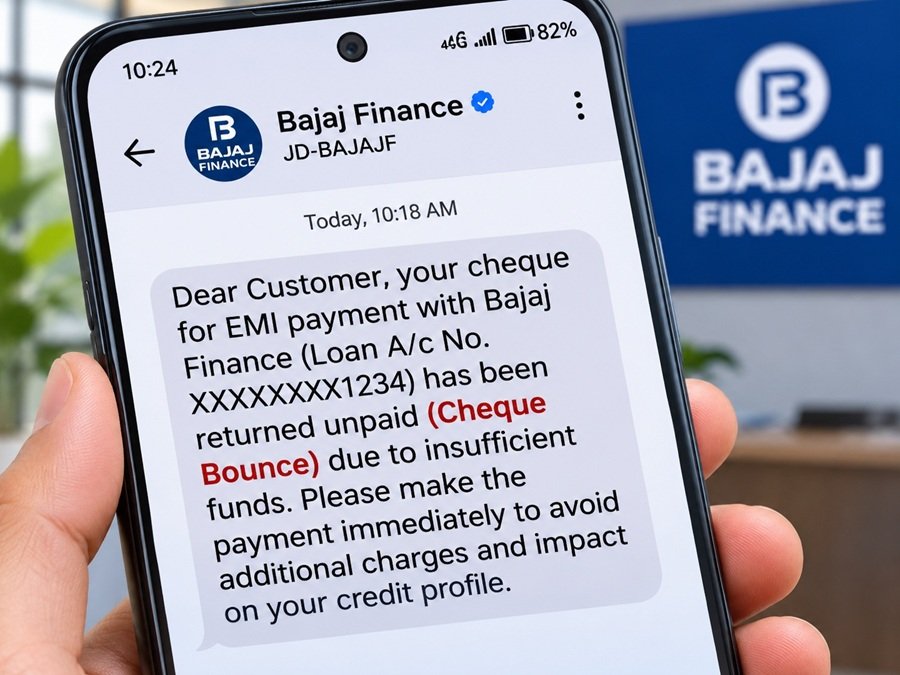
Quick Answer: What does a Bajaj cheque bounce message mean?
Your EMI debit (cheque or NACH mandate) failed and the instalment is unpaid. One return does not automatically mean a Section 138 case. Bajaj lists bounce charges up to ₹1,200 on personal loans and ₹1,500 on business loans, plus up to 36% a year penal charge on the late EMI. Pay through the official app quickly.
Source: Bajaj Finance Fees and Charges page, Bajaj Finance cheque return guide, RBI. Checked 28 November 2026.
A Bajaj cheque bounce message usually lands a day or two after your EMI date, and the first question is always the same: how bad is this? The honest answer is that one bounce is fixable, costs a known amount, and only turns serious if it is ignored. This guide from Pro Business Cop walks you through a real set of messages a borrower received, what each line means, what it really costs, when the law gets involved, and exactly what to do over the next 30 days.
What a Bajaj Cheque Bounce Message Actually Tells You


When an EMI fails, you rarely get just one message. You usually get two or three, from two different senders, and reading them together tells you the full story.
Message 1 comes from your own bank. It says a debit failed or was returned, and sometimes gives a reason such as insufficient balance. This is the bank telling you the money did not leave your account.
Message 2 comes from Bajaj Finance. It says the EMI is unpaid, mentions overdue status or charges, and asks you to pay. For EMI Network Card holders, it may also say the card has been blocked.
Message 3 is the one you want. It confirms that your overdue payment has been received and will be posted to your loan account.
A real example: three messages from one bounce
A borrower shared these screenshots with Pro Business Cop. We masked the card number, loan account number, bank account number, balance, UPI reference and link code. Nothing else has been changed.
Bajaj cheque bounce message showing EMI card blocked alert and overdue payment confirmation
Bank SMS confirming UPI payment of overdue EMI to Bajaj Finance after a bounce
Here is what each message tells you:
| Message | Sender | What it means | What the borrower had to do |
|---|---|---|---|
| “Card Blocked! Your EMI card ending XXXX is temporarily blocked due to EMI bounce on your loan” | Bajaj Finance Ltd | The EMI debit failed, so Bajaj blocked the EMI Network Card under its credit policy | Pay the overdue amount immediately |
| “…we shall confirm on your unblocking date by 30th of this month subject to repayment, CIBIL & loan performance” | Bajaj Finance Ltd | Paying does not unblock the card on the spot. Bajaj reviews the account first | Wait for the review after paying |
| “Rs.3509.00 paid thru A/C XXXX on 05-1-26 … to Bajaj Finance L, UPI Ref XXXX” | The borrower’s bank (Canara Bank) | The overdue amount left the bank account by UPI | Save this SMS and the UPI reference as proof |
| “Your overdue payment of Rs. 3509.0 for loan A/c no. XXXX will be processed in 1 business day” | Bajaj Finance Ltd | Bajaj has received the payment and will post it to the loan account | Check “View Statement” after one business day |
Three details in these real messages are worth noticing:
- The unblock is not instant. Bajaj’s own help page says that if an EMI Network Card is blocked because of internal policy such as a low CIBIL score or an overdue payment, it is unblocked only once you meet that policy again. The message in our example sets the review date as the 30th of the month.
- The payment confirmation has a lag. “Processed in 1 business day” means your Statement of Account may still show the EMI as overdue for a day. Do not pay twice.
- The real Bajaj message had a formatting glitch. The text shows a literal “\n” where a line break should be. A glitch alone does not make a message fake, and a clean message does not make it real. You verify a message by the sender and the link, which we cover below.
The same bank thread also showed a separate ₹1.00 “hold removed” alert that morning. That is an unrelated bank entry. Do not read it as a refund of your bounce charge.
Cheque Bounce vs NACH Bounce: Why Most “Cheque” Messages Are Not About a Cheque
Most borrowers search for “cheque bounce” even when no cheque was involved. Today, most Bajaj EMIs are collected through a NACH mandate or e-mandate, which is an auto-debit you signed up for at the time of the loan. When that auto-debit fails, it is called a NACH return or ECS bounce, not a cheque return.
The difference matters for two reasons:
- The reason codes are different. Cheques returned through the clearing system carry CTS return codes, such as 01 for insufficient funds and 50 for account closed. NACH returns use a separate set of codes issued by NPCI.
- The law is different. A bounced cheque falls under Section 138 of the Negotiable Instruments Act. A failed NACH debit falls under Section 25 of the Payment and Settlement Systems Act, 2007. More on this below.
If your EMI is still paid by cheque, note that many cheque returns have nothing to do with balance. Bajaj’s own list of return codes includes signature-related reasons (codes 10 to 17) and an amount mismatch (code 34), which usually come from how the cheque was written. Our guide on how to fill a cheque covers each field, and if you are depositing a replacement or refund cheque, see how to fill a cheque deposit slip so it is not delayed.
Why NACH code numbers do not match across websites
If you search for NACH return codes, you will find payment companies giving different numbers for the same reason. One lists 04 as “Balance Insufficient” and 01 as “Account Closed”, while another lists 01 as insufficient funds. Some sites also borrow US ACH codes like R01, which are not Indian NACH codes at all. The safe rule is simple: read the reason text in your bank statement or return memo, not the number, and treat NPCI’s own circulars as the only authority on codes.
Common reasons a Bajaj EMI bounces, and the fix
| Reason in the bank message | What went wrong | The fix |
|---|---|---|
| Balance insufficient | Money was not in the account on debit day | Pay the overdue amount now. Ask Bajaj if your EMI date can match your salary date |
| Mandate not registered or cancelled | The auto-debit instruction is missing or expired | Re-register the mandate through the Bajaj Finance app |
| Account closed or frozen | The linked account cannot be debited | Link a new active account and pay the overdue amount separately |
| Signature or details mismatch | Mandate details do not match your bank records | Correct the details with your bank and re-register |
How Much One Bounce Really Costs You
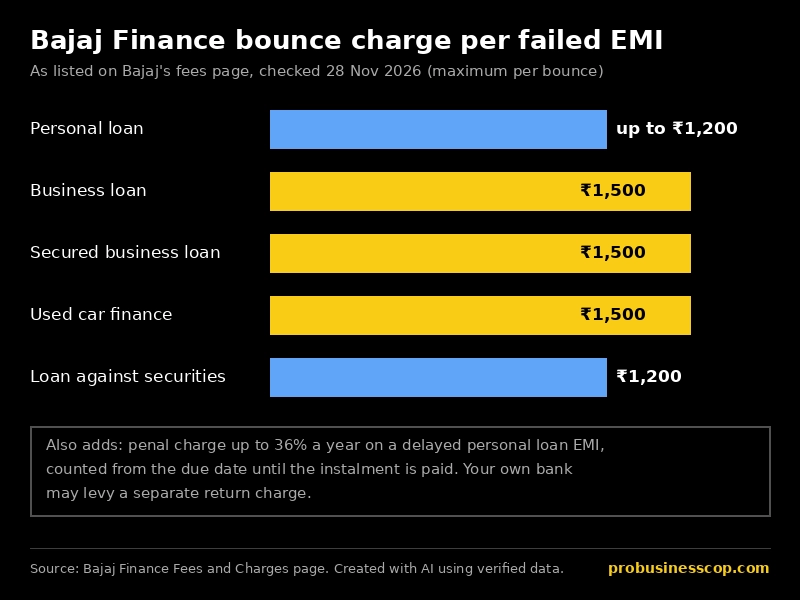
This is where most guides go vague. Here is what Bajaj’s own published schedule says, checked on 28 November 2026.
| Charge | Amount as listed by Bajaj Finance | When it applies |
|---|---|---|
| Bounce charge, personal loan | Up to ₹1,200 per bounce | Each failed instalment |
| Bounce charge, business loan, secured business loan, used car finance | ₹1,500 per bounce | Each failed instalment |
| Penal charge on a delayed personal loan EMI | Up to 36% a year on the unpaid instalment | From the due date until the instalment is fully paid |
| Your own bank’s return charge | Set by your bank | When the bank returns the debit |
Two lines in Bajaj’s terms are worth reading slowly:
- Bajaj defines bounce charges as charges for a dishonoured payment instrument or for non-payment of an instalment on its due date because the mandate was dishonoured, was not registered, or “any other reason”. So a missing mandate can cost the same as an empty account.
- Bajaj’s charge definitions also say a bounce charge applies to each instance, even if you pay through another channel on the same day. Paying late in the evening does not cancel the charge for that morning’s failed debit.
Bajaj cheque bounce message charges compared by loan type
A worked example
Say your personal loan EMI is ₹3,500 and it bounces. You could face:
- A Bajaj bounce charge of up to ₹1,200
- A penal charge on ₹3,500 for the days it stays unpaid. At 36% a year, that works out to about ₹3.45 a day (₹3,500 × 36% ÷ 365). Ten days late adds roughly ₹35
- Your bank’s own return charge, which depends on your bank and account type
The point of the example: the bounce charge is the big hit and it is fixed the moment the debit fails. The penal charge is small per day but keeps running, so paying fast still saves money. Whether GST is added to the bounce charge is not stated on Bajaj’s fee schedule for this line, so check the exact breakup in your Statement of Account.
When a bounce charge should not apply
Bajaj’s own guide notes that under RBI rules, banks should not levy a return charge when the customer is not at fault, for example a technical return. RBI’s 2023 circular on penal charges (RBI/2023-24/53) also requires lenders to disclose the amount and reason for penal charges clearly. If your statement shows a charge you cannot match to a real bounce, you have grounds to dispute it.
Will One Bounced EMI Hurt Your CIBIL Score?
A single bounce that you clear quickly is very different from an EMI that stays unpaid for weeks. Credit bureaus see your account in terms of days past due (DPD), so the length of the delay matters more than the bounce itself.
What has changed is how fast lenders report. Under RBI’s circular RBI/2024-25/60, lenders must update credit information fortnightly, as on the 15th and the last day of each month, effective 1 January 2025. Each fortnight’s data must be submitted within seven calendar days.
In practical terms, an overdue EMI can show up on your credit report within about two weeks, not a month or more as it often did earlier. Clearing the overdue amount before the next reporting date may limit how it appears, but no one can promise that, because the outcome depends on the lender’s records and timing.
Our real example shows the other side of this. Bajaj’s message tied the card unblock to “repayment, CIBIL & loan performance”. A bounce can affect your access to Bajaj’s own credit, like the EMI Network Card, even before it affects your score. If you plan to take a new loan soon, read our guide on checks before accepting a pre-approved loan, because lenders look at recent repayment behaviour.
When Can a Bounce Turn Into a Legal Case?

This is the fear behind most searches, so let us be precise. An SMS is not a legal notice. Bajaj’s own guide states that a cheque return does not automatically lead to a Section 138 case or NPA classification. A legal case needs several specific steps, and each has a deadline.
Bajaj cheque bounce message legal timeline under Section 138 and Section 25
For a bounced cheque: Section 138, Negotiable Instruments Act
- Within 30 days of receiving the bank’s return memo, the payee must send a written demand notice.
- Within 15 days of receiving that notice, the person who issued the cheque can pay the amount. If payment is made in this window, the offence under Section 138 is not complete.
- Within the next 30 days after those 15 days end, the payee can file a complaint before a Magistrate.
For a failed NACH or ECS debit: Section 25, Payment and Settlement Systems Act
Section 25 of the PSS Act treats the dishonour of an electronic funds transfer, such as a NACH mandate, in a way similar to a cheque bounce. It also says the cheque-bounce provisions of the Negotiable Instruments Act apply “to the extent the circumstances admit”. Court records show lenders filing complaints under Section 25 of the PSS Act read with Section 138 when a NACH debit is returned for “Balance Insufficient” and the borrower does not pay after a demand notice.
None of the guides ranking for this topic mention this, yet it is the law that applies to most modern EMI bounces.
What about the “security cheque” you signed at loan time?
Many borrowers believe a security cheque cannot be used against them. Courts have not always agreed. In one reported magistrate judgment, the accused argued the cheque was given only as security, and the court held that a security cheque can also attract liability under Section 138. Every case turns on its own facts, so if you receive a legal notice about a security cheque, speak to an advocate rather than relying on general rules.
How to tell a real legal notice from a reminder SMS
A genuine demand notice is a formal written document, usually sent through an advocate by registered or speed post. It names the cheque or mandate, the amount, and the date of dishonour, and gives you 15 days to pay. A reminder SMS or WhatsApp message asking you to “pay immediately” is a collection message, not a notice under Section 138.
Your 30-Day Action Plan After a Bajaj EMI Bounce

Bajaj cheque bounce message 30 day action plan checklist
Day 0 to Day 1: confirm and pay
- Check that the message is genuine (see the next section).
- Open your bank statement and read the return reason for the failed debit.
- Pay the overdue amount through the Bajaj Finance app or My Account, not through a link in a message. Our Bajaj Finance app and customer care guide has the official contact routes.
- Save the bank debit SMS and UPI reference, like the borrower in our example did.
Day 2 to Day 7: fix the cause
- Check your Statement of Account after the processing time Bajaj gives you. In our example, that was one business day.
- If the mandate was the problem, re-register it in the app.
- Match every charge on the statement against the fee schedule.
Day 7 to Day 30: dispute or defend
- If a charge looks wrong, raise a written request. In My Account, sign in with your mobile number and OTP, then go to My Relations, Loans, Help & Support, and Raise Request.
- If you received a formal legal notice, note the date you received it. The 15-day payment window starts from that date.
- If your EMI Network Card was blocked, wait for the review date given in the message before chasing customer care.
Is the Message Real? How to Spot a Fake Bajaj Bounce SMS
Fraudsters copy bounce messages because panic makes people click. Bajaj has warned about fake “pay your overdue EMI” pages built to look like its payment portal and capture card or banking details.
Use this checklist before you act on any bounce message:
- Check the sender. Bajaj says its official SMSes come from the sender code ‘BAJAJF’. A message from a normal 10-digit mobile number is a warning sign.
- Do not trust the link, even in a real message. Our real example contained a short link. We could not confirm that link’s domain on Bajaj’s official pages, so the safe habit is the same for every message: ignore the link and open the Bajaj Finance app or website yourself.
- Check the amount against your loan. A bounce message for an EMI amount you do not recognise, or for a loan you do not have, is a red flag.
- Never share an OTP or install a screen-sharing app. Bajaj says its representatives never ask you to install remote access apps such as AnyDesk or TeamViewer.
If you already clicked a link or shared details, stop contacting the sender, block your card or account through your bank, and report it at cybercrime.gov.in or by calling 1930. Then inform Bajaj Finance separately.
How to Dispute a Wrong Bounce Charge
Wrong charges happen, especially when a payment and a debit cross on the same day or when your bank made a technical error. Here is the order to follow:
- Complain to Bajaj Finance first, in writing. Use Raise Request in My Account or the channels on Bajaj’s grievance redressal page. Attach your bank statement, the bounce SMS and your payment proof.
- Wait 30 days. Under the Reserve Bank Integrated Ombudsman Scheme, 2026, a complaint filed before 30 days have passed since your complaint to the lender is not accepted, unless the lender has already replied and you are unhappy with the reply.
- Escalate to the RBI Ombudsman. File online at cms.rbi.org.in. Most NBFCs registered with RBI, including deposit-taking NBFCs, are covered.
- Do not miss the outer deadline. A complaint filed more than 90 days after the applicable timeline expires or after the lender’s last reply, whichever is later, can be rejected.
How to Stop the Next Bounce
Prevention here is mostly about timing, not willpower.
- Align your EMI date with your income. If salary arrives on the 7th and your EMI hits on the 2nd, every month is a gamble. Ask Bajaj whether your date can be changed.
- Keep one EMI as a buffer. A small balance sitting above your EMI amount absorbs a late salary or an unexpected UPI spend. Our emergency fund calculator helps you size this.
- Check your total EMI load. If more than half your take-home pay goes to EMIs, bounces become likely. Run your numbers through the personal loan EMI calculator before taking another loan.
- Watch for rate changes. If your loan has a floating rate, an RBI policy change can move your EMI. Our explainer on what RBI’s policy means for your personal loan EMI covers this.
- Self-employed? Separate your accounts. Paying a personal EMI from a business account with irregular inflows is a common cause of bounces. Our comparison of business loan vs personal loan explains which fits irregular income better.
Frequently Asked Questions
What are Bajaj Finance bounce charges on a personal loan?
Bajaj’s published fee schedule lists bounce charges of up to ₹1,200 per bounce for personal loans, checked on 28 November 2026. Business loans, secured business loans and used car finance carry ₹1,500 per bounce. Your loan agreement and Key Fact Statement show the exact figure for your account.
Does one EMI bounce reduce my CIBIL score?
A bounce cleared within days usually matters far less than an EMI left unpaid. Lenders now report to credit bureaus every fortnight, so a delay can appear on your report within about two weeks. Paying quickly is the best way to limit the damage.
Can Bajaj Finance file a case for a bounced EMI?
It can, but only after a formal process. For a cheque, it must send a demand notice within 30 days of the return, and you get 15 days to pay. For a NACH debit, Section 25 of the Payment and Settlement Systems Act applies in a similar way.
Why is my Bajaj EMI card still blocked after I paid?
If the card was blocked under Bajaj’s credit policy, it is reviewed and unblocked only after you meet that policy again. The block message in our real example promised confirmation by the 30th of the month, subject to repayment, CIBIL and loan performance.
How do I know if a Bajaj bounce SMS is fake?
Check whether it came from the ‘BAJAJF’ sender code, avoid any link inside it, and open the official app to see if your loan actually shows an overdue amount. Any request for an OTP, an upfront fee or a screen-sharing app is a fraud signal.
Can I get a Bajaj bounce charge waived?
Waivers are at Bajaj’s discretion and depend on your payment history. You have a stronger case if the bounce was caused by a bank error or a technical return, since RBI rules say a customer should not be charged when not at fault.
Got a Bounce Message Today? Start Here
The fastest way to stop a bounce from growing is to pay the overdue amount through the official app, save your proof, and fix whatever caused the debit to fail. If EMIs are starting to feel tight, use the Pro Business Cop personal loan EMI calculator to see what your income can comfortably carry, and browse our finance guides for more plain-language help on loans and credit.
Disclaimer
This article is for general information only and is not legal or financial advice. Pro Business Cop is not affiliated with Bajaj Finance Limited. Charges, policies and laws can change, so confirm the details for your account with Bajaj Finance and consult a qualified advocate if you receive a legal notice. Read our full disclaimer.

2 Comments
Pingback: How To Fill Cheque: Self, Other Person & SBI Cheque Guide 2026
Pingback: Cancelled Cheque Image: Samples, How To Make & Upload Right